

We have enabled resellers to receive notifications for all the accounts them manage. This blog post is going show how to enable and manage this feature.
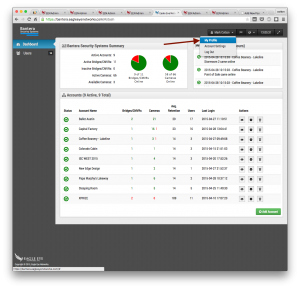
When logged into your reseller account, you will choose ”My Profile” from the account menu in the upper right.
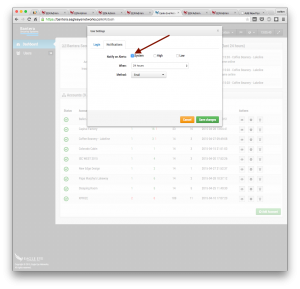
Click on the ”Notifications” tab and select ”System”.
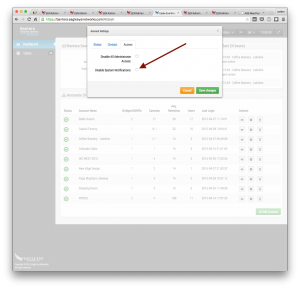
In the settings for each sub-account, you can now select if you would like to receive notifications. By default they are disabled.

Since 2012, Eagle Eye Networks has provided smart cloud surveillance solutions, leveraging AI to drive natural language search, automation, and more. Eagle Eye’s camera-agnostic approach heightens security while saving money, time, and resources.
Andra inlägg som kan intressera dig

Dean Drako, Eagle Eye Networks CEO
Dean Drako, Eagle Eye Networks CEO Power Profile for ISC West | April 5, 2016 | 10:30-11:30am PT SIA Annual Membership Meeting: Power Profile Dean Drako, the company’s President and…
mars 19, 2016
Eagle Eye Networks Team at ISC West
Eagle Eye Networks ISC West 2016 | April 6-8, 2016 | Las Vegas | Booth #29087 Set up a meeting with the Eagle Eye Networks Team at ISC West
mars 19, 2016
Power Supplies: What are they?
What are power supplies? What is the difference between internal and external? Why do I need them? Well, power supplies are important because they are how your devices receive power to…
oktober 6, 2015