


This week we’re releasing Eagle Eye CameraManager Platform version 18.1. In this release we introduce new features like Camera Modes, Enable/Disable Cameras and an Improved Zone Overview.
Camera Modes
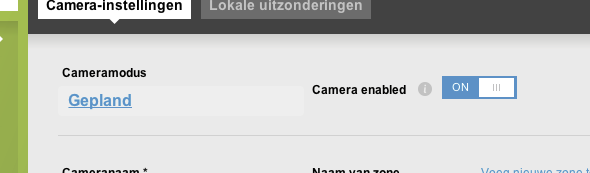
At the moment you can only manage the status of your camera via the zone mode. For example, if a zone mode is „armed“, all cameras in the zone are recording. As of Eagle Eye CameraManager 18.1, this can be managed per camera. The following zone modes are supported:
- Armed – Continuous recording with notifications.
- Disarmed – No recording and no notifications
- Silent – Continuous recording without notifications
- Scheduled – Recording and notifications according to scheduling settings
Enable/Disable Cameras
You can now disable the camera. When disabling, the camera remains connected to the Cloud but it will no longer record, show motion detection events, and viewing live video is no longer possible. You can disable the camera in the camera settings.
Improved Zone Overview
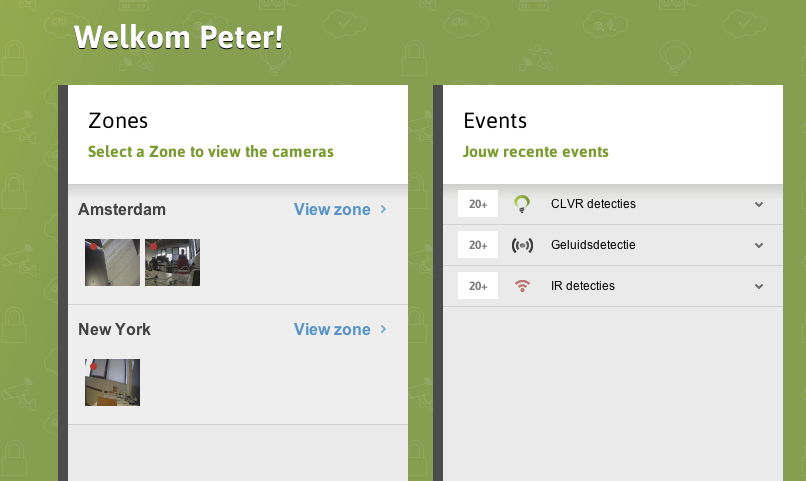
The zone overview now shows a snapshot of the camera with the camera recording status indicating by the RED circle in the snapshot.
Feel free to contact our Support Team when you have any questions.
Contact Us

Since 2012, Eagle Eye Networks has provided smart cloud surveillance solutions, leveraging AI to drive natural language search, automation, and more. Eagle Eye’s camera-agnostic approach heightens security while saving money, time, and resources.
Andere Beiträge, die Sie interessieren könnten


Eagle Eye CameraManager Adds Supported Cameras
Eagle Eye Networks has added nine supported Eagle Eye Cameras to Eagle Eye CameraManager, expanding the existing portfolio of indoor and residential oriented cameras. Eagle Eye CameraManager supports a wide range…
Juni 11, 2019
Einführung der Instant-MP4-API zur Dateigenerierung für Eagle Eye CameraManager
Sofortige Video-Vorschau Eagle Eye hat eine verbesserte Version unserer MP4 API veröffentlicht. Diese API kann von Entwicklern verwendet werden, um direkt generierte MP4-Dateien mit benutzerdefinierten Start- und Endzeiten anzufordern. Die…
September 19, 2018
24 Hour Video Summary
In the last update for our mobile applications, we added a great and convenient feature: the 24-Hour Video Summary. With this video summary, you can instantly generate a 30-second video…
August 3, 2018