

Al guardar un vídeo clip, se pueden introducir notas que después aparecerán indexadas en la página de Notificaciones. También se pueden añadir, actualizar y cambiar notas en la página de Notificaciones dentro del periodo de retención. Anteriormente, para añadir notas a un clip descargado, el vídeo tenía que cargarse una segunda vez, pero ahora simplemente hay que hacer clic directamente en el campo notas.
Este es un ejemplo de lo que sería la página de notificaciones: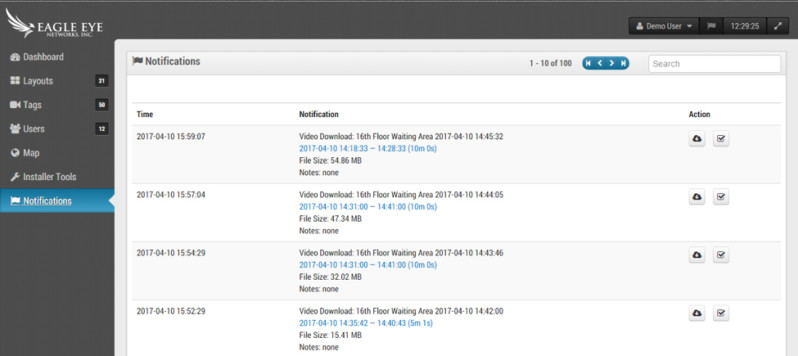 Cada descarga permite añadir notas simplemente haciendo clic. Si quiere más información sobre el uso de esta función, visite nuestro blog de soporte técnico.
Otras publicaciones que te pueden interesar


5 Cutting-edge AI technologies for video security
Every year seems to be “the Year of AI,” but this time, it seems to be actually true. And the benefits of this incredible new technology can be seen in…
mayo 14, 2024

How License Plate Recognition provides a seamless and safe parking experience
To run a parking operation successfully, you need to know what is happening in your lot or garage at all times and meet your visitors’ expectations for a seamless parking…
mayo 13, 2024

Cloud Security Summit Sets Attendance Record
Over 300 Eagle Eye Networks and Brivo reseller partners attended the 5th annual Eagle Eye Networks and Brivo Cloud Security Summit, setting an attendance record for the annual conference. The…
noviembre 9, 2022
