
Eagle Eye Networks

Sicherheit Kamera System

Alles, was Sie über die Bereitstellung, Verwaltung und Aktualisierung Ihres Sicherheitskamerasystems mit dem Eagle Eye Cloud VMS wissen müssen.

Verizon Modem Integriert

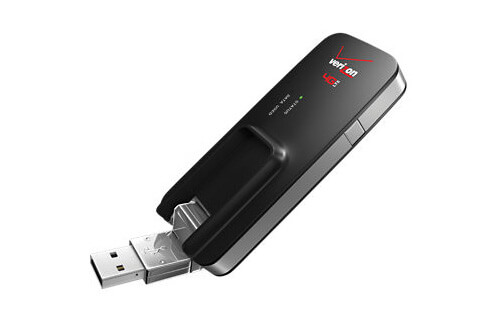
Eagle Eye networks ist jetzt mit dem Verizon MiFi 4G LTE Global USB Modem U620L integriert. Das heißt, dass jede Eagle Eye Bridge oder jeder Eagle Eye Cloud Managed Video Recorder (CMVR) mit dem Eagle Eye Cloud Data Center, über eine Mobilfunkverbindung, verbunden werden kann. Das Verizon MiFi Cellular Modem

Read More »

Erweiterte Übertragungsmodi

Eagle Eye Networks hat vor kurzem drei neue Bandbreite-Modi hinzugefügt, aus denen Benutzer nun wählen können: Prozentualer Anteil der Verfügbaren – Man kann jetzt die Übertragungsrate der Bridge auf einen prozentualen Anteil der verfügbaren Bandbreite einstellen. Dadurch werden die Standarteinstellung so wie die geplante Übertragungsrate verändert. Mit einem Schieberegler kann

Read More »
camera-settings-from-layout

Zugriff auf Kameraeinstellungen

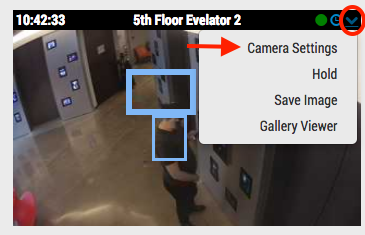
Mit den entsprechenden Berechtigungen können Sie über das Dashboard oder die Layoutansicht auf die Kameraeinstellungen zugreifen. Klicken Sie im Dashboard auf das Zahnradsymbol, um die Kameraeinstellungen zu öffnen. Klicken Sie von einem Layout auf das Dropdown-Menü in der oberen rechten Ecke des Vorschaubilds und wählen Sie die gewünschten Einstellungen aus.

Read More »
Adjusting Motion Settings

Anpassen der Bewegungseinstellungen

Bereiche und Alarme Das Eagle Eye Networks Cloud VMS erlaubt eine unbegrenzte Anzahl an Bereichen und Alarmen pro Kamera. Diese können unter Kameraeinstellungen hinzugefügt werden und im Bewegung-Tab ausgewählt werden. In diesem Beispiel wird ein Bereich mit dem Namen Entry-Exit angezeigt mit einer von der allgemeinen Bildempfindlichkeit abweichenden Bewegungsempfindlichkeit. Eine Übersicht der Bewegungseinstellungen kann hier gefunden werden.

Read More »
Checksum to Ensure Data Integrity

Ensure Data Integrity with Checksum

At Eagle Eye Networks we are often asked about ‘Watermarking’ on our recorded video to ensure data integrity. This can be guaranteed by using the ‘checksum’ approach as used in many digital data transfers. The article below from ‘Online Tech Tips’ explains ‘Checksum’ and how it is used to ensure

Read More »
Add Camera Enhancements

Add Camera Enhancements

Feature Release December 13, 2016 Add Camera Enhancements When adding a camera, some settings can be edited while waiting for the add camera process to complete. Name and tags are presented for editing while adding. Clicking „more settings“ allows editing the On/Off/Schedule, Time Zone and Notes. Examples From the Dashboard,

Read More »
Links for Historic Video

Links for Historic Video

Feature Release October 4, 2016 Create Links from History Browser It’s now possible to get a link to a specific time or selection of time in the history browser so that you can send it to someone who has access to the camera you are viewing. History browser with time selection

Read More »
Manage Multiple Locations Easily

Manage Multiple Locations Easily

People are busy and can’t be everywhere at once.  Now imagine that you’re a business owner trying to manage multiple locations.  There is a lot to keep an eye on. Eagle Eye Networks is well positioned to assist all verticals that have multiple locations – for security purposes and beyond.

Read More »
POE Switch-FI

New Managed PoE Switches

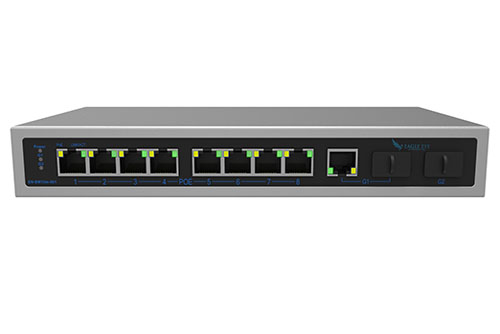
Eagle Eye Networks now offers Managed PoE Switches, and that’s great news.  Integrating Eagle Eye Networks Managed PoE Switch with your existing system allows for additional tools that enable faster installation, easier maintenance and upgrades, and better visibility into network health. Utilizing Eagle Eye Network’s Managed PoE Switches with your

Read More »
adding-cameras-through-RTSP

Adding Cameras Through RTSP

For best results, we recommend using cameras on our officially supported list. We also understand that this isn’t always possible. Some installations need to make use of existing equipment or may have specialty cameras. We have an advanced option that allows for adding cameras directly. We support RTSP and can

Read More »
Interactive Maps Feature

Interactive Maps Feature

The Eagle Eye Security Camera VMS has added a maps feature to the viewing platform. This user-controlled feature has integrated a map into the user-platform and provides a physical layout of a camera system. Here is what the layout looks like, using the Eagle Eye Networks office and camera layout

Read More »
Gallery Viewer for Viewing Record

New Gallery Viewer Feature

We’ve added a new gallery viewer feature to the Eagle Eye Security Camera VMS, making viewing historic video easier and more intuitive than ever. When looking through previously recorded video, it is easier to navigate if you have more visibility– especially if you’re looking with a purpose. Our gallery viewer

Read More »
masking-out-motion-areas

Creating Email Alerts

In part 1, we showed how to mask out a motion zone to ignore motion. In this post we are going to show how to create email alerts. We will be setting up email alerts on my front door. I am interested on getting an email notification whenever someone enters

Read More »
new-guided-tour-features

New Guided Tour features

We try to keep our product simple and easy to use. One way we do this is by guiding new installers through the setup process. Below is the new setup process with guided instructions. When first logging in, you will be prompted to add a bridge. While the bridge is

Read More »
masking-out-motion-areas

Masking Out Motion Areas

Often there is repetitive motion in a scene that you want to ignore. A great example of this is a TV or a swaying tree. Having constant motion makes it difficult to quickly find the item you are looking for. It is like adding more hay to the stack when

Read More »