Eagle Eye Networks

Security Camera System

Everything you need to know about deploying, managing and upgrading your security camera system with the Eagle Eye Cloud VMS.

Analytics-Intrusion-Detection-2

Intrusion Detection

About Intrusion Detection Intrusion detection is used to generate an alert when an object enters a forbidden area. The forbidden area may be any size and shape. Notifications may be sent. Intrusion regions are created the same way as motion regions. Click the yellow plus (+) symbol to add a


Read More »
Analytics-Setup

Enabling Video Analytics

How to Enable Video Analytics To enable Video Analytics, go to camera settings and choose the Analytics tab. Each analytic may be enabled separately and is billable per camera. A new tab will appear for each when clicking the checkbox. Camera Settings – Enabling Analytics To view the analytics overlay

Read More »
Security-Analytics-New-Line-Crossing-Image

Security Analytics

Eagle Eye Networks released Line Crossing and Intrusion Detection security analytics for the Eagle Eye Cloud Security Camera VMS. These security analytics ensure surveillance images are continuously analyzed in real-time to alert Eagle Eye Customers to things that need attention. Custom alerts can be generated, and these analytics can be

Read More »
Business-Analytics-Blog-Image

Business Analytics

Eagle Eye Networks launched Object Counting business analytics for the Eagle Eye Cloud Security Camera VMS. With Object Counting, businesses can interpret data directly from the source to help them make smarter decisions. Some examples include: Monitoring presence to reduce utility bills Identifying patterns in customer activity to improve sales

Read More »
pp-feature-1

CameraManager: Plug & Play Cameras

How to add Cameras to Your CameraManager Account using Plug & Play Did you know you don’t need any technical background to add a camera to your Eagle Eye CameraManager account? Our recommended CloudCams all come with Plug & Play functionality. This means the system recognizes cameras and can be

Read More »
sdvk-fi

CameraManager MobileSDKv2

Eagle Eye Networks launched the CameraManager MobileSDKv2. The Eagle Eye CameraManager platform allows partners to integrate CameraManager into their own platform. The MobileSDK is the essential building block for partners to integrate Eagle Eye CameraManager into their own mobile applications. It allows partners to focus on the user interface while

Read More »
sdvk-fi

CameraManager MobileSDKv2 Feature

Open platform The Eagle Eye CameraManager platform is an open platform which can be integrated by third party developers. Partners can create their own mobile and web applications based on the CameraManager Cloud. Partners are integrating Eagle Eye CameraManager into their own mobile app. MobileSDK The MobileSDKv2 is the new

Read More »
PoE-Switch-FI

Managed PoE Update New Features

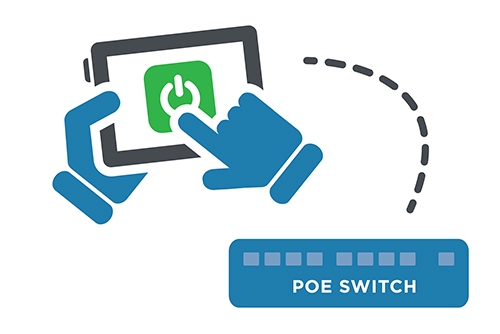
Remote PoE The Eagle Eye Managed PoE Switches provide more functionality directly from the Eagle Eye Reseller Dashboard. Authorized users will be able to power cycle an individual PoE camera or the entire switch remotely, so there is no need to send service personnel to reboot or restart cameras. Power

Read More »
PoE-Switch-FI

Managed PoE Update

The Eagle Eye Managed PoE Switches and Bridges can now allow users to remotely power cycle cameras directly from the Eagle Eye Reseller Dashboard. This new feature will save Eagle Eye Resellers time and money by greatly reducing truck rolls. If you would like to have early access to this

Read More »
Dynamic-Filtering-FI

Dynamic Filtering

Eagle Eye Networks has enhanced the ability to find and view cameras across many locations.  Typing the name, tag, location, or address will display results immediately in any view.  Create a layout or save the filter for quick retrieval. If you would like to have early access to this new

Read More »
Dynamic-Filtering-FI

Dynamic Filtering Usage

From any view, enter text to filter results in real time. The name, tag, address, and location are used to filter. The results are displayed as text is entered and remain persistent until the text is cleared. Clearing the text can be done by pressing «Esc» on the keyboard, or

Read More »
IPad-Navigation

New iOS Mobile Features

Eagle Eye Networks has released two new iOS features for its mobile app, making the user interface more efficient. The Advanced Searching Feature allows users to search by tags, locations, or any available metadata. The search results are quickly displayed for live viewing and can be toggled to list view,

Read More »

Eagle Eye Networks Launches Camera Cyber Lockdown – UK

June 5, 2017 Enhanced Eagle Eye Cloud Security Camera VMS now includes a firewall to block cameras from external communication even if they have infections or trojans. Austin, TX – Eagle Eye Networks, Inc. today announced it has added Camera Cyber Lockdown to all of its products. Eagle Eye Camera Cyber

Read More »
TwoFactor-FI

Two Factor Authentication Configuration

Enabling Two Factor Authentication In the top right corner of the Eagle Eye Networks web interface, click on your username and select “My Profile.” Check the box labeled Two Factor Authentication and follow the prompts to enable. Don’t forget to save your changes. If a phone number has not been

Read More »
TwoFactor-FI

Two Factor Authentication

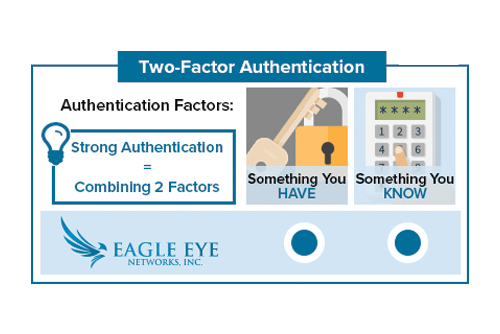
With Two Factor Authentication, an Eagle Eye Networks account can only be accessed on a trusted device. When a user wants to log into a new device for the first time, the user will need to provide two pieces of information – a password and a four-digit security code. The

Read More »